Send email from Next.js with Mailbay
A route handler and two environment variables. Keep the Resend SDK and change its base URL, or call the API with fetch. We ran all three against Mailbay.
RESEND_BASE_URL=https://api.mailbay.dev/v1
RESEND_API_KEY=mb_live_xxxxxxxxx   # a Mailbay Sending only key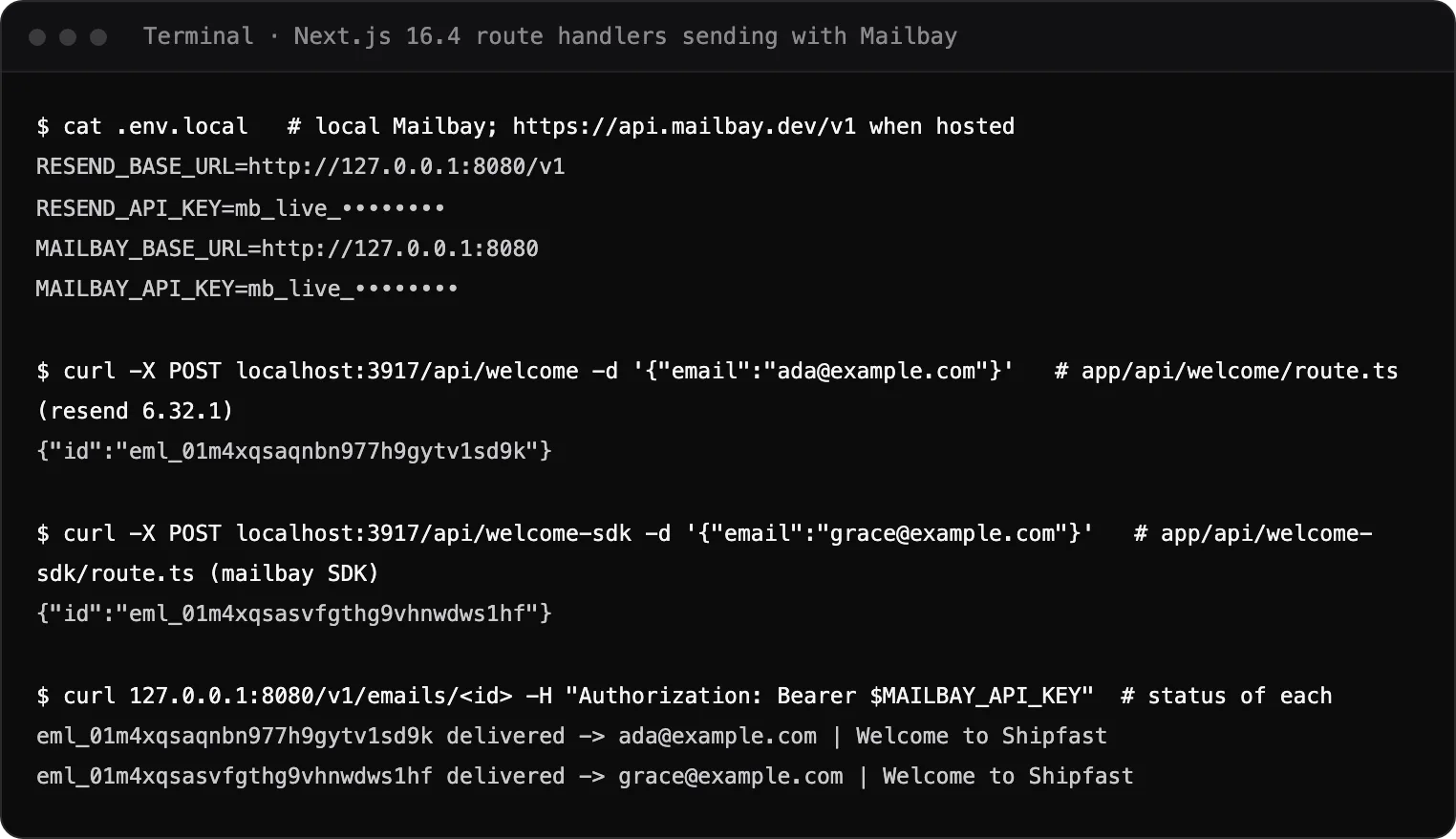
Set up in one paste
If your app already sends with the Resend SDK, step 3 is the whole migration.
- 1
Verify your domain
The from address must be on a domain verified in your Mailbay project. Records and checks are in the domains docs. - 2
Create a Sending only key
It can send and read the send log, and nothing else. Keep it in server env vars. - 3
Set two env vars
RESEND_BASE_URLandRESEND_API_KEYin.env.localand in your host's settings. Never with aNEXT_PUBLIC_prefix.
The route handler
Three ways to make the same call. All three ran against Mailbay and returned an email id.
import { Resend } from "resend";

const resend = new Resend(process.env.RESEND_API_KEY); // reads RESEND_BASE_URL

export async function POST(request: Request) {
  const { email } = await request.json();
  const { data, error } = await resend.emails.send({
    from: "Acme <noreply@acme.com>",
    to: [email],
    subject: "Welcome to Acme",
    html: "<p>Thanks for signing up.</p>",
  });
  if (error) return Response.json({ error }, { status: 400 });
  return Response.json(data); // { id: "eml_..." }
}
Tested with resend 6.32.1.
import { Mailbay, MailbayError } from "mailbay";

const mailbay = new Mailbay(process.env.MAILBAY_API_KEY);

export async function POST(request: Request) {
  const { email } = await request.json();
  try {
    const { id } = await mailbay.emails.send({
      from: "Acme <noreply@acme.com>",
      to: email,
      subject: "Welcome to Acme",
      html: "<p>Thanks for signing up.</p>",
    });
    return Response.json({ id });
  } catch (e) {
    if (e instanceof MailbayError) return Response.json({ code: e.code, fix: e.fix }, { status: e.status || 500 });
    throw e;
  }
}
Coming to npm: the package is being published. We ran it from the repository build.
export async function POST(request: Request) {
  const { email } = await request.json();
  const res = await fetch("https://api.mailbay.dev/v1/emails", {
    method: "POST",
    headers: {
      Authorization: `Bearer ${process.env.MAILBAY_API_KEY}`,
      "Content-Type": "application/json",
      "Idempotency-Key": `welcome-${email}`, // a retry never sends twice
    },
    body: JSON.stringify({
      from: "Acme <noreply@acme.com>",
      to: email,
      subject: "Welcome to Acme",
      html: "<p>Thanks for signing up.</p>",
    }),
  });
  // { id } on success, { error: { code, message, fix } } otherwise
  return Response.json(await res.json(), { status: res.status });
}
No dependency. Sent twice with the same Idempotency-Key, it returned the same id and sent once.
The full request and response, scheduling and batches are in the Emails API docs; the SDK's methods and errors are in the Node SDK docs.
What you can do from Next.js
POST /v1/emailsWelcome and receipt emails
From your own domain, withhtml,text, attachments and tags.Schedule and batch
Send later withscheduled_at, or up to 100 emails in one request.Auth emails from Supabase
Using Supabase Auth? Point it at Mailbay with custom SMTP, no code needed.Retries that never double send
The sameIdempotency-Keywithin 24 hours returns the first result.Know what happened
Read a send's status, or getmessage.*webhooks for delivered and bounced.
A real run
On October 14, 2026 we created a Next.js 16.4.0 app with these route handlers, set .env.local to a local Mailbay stack, and posted to each one. Each returned an email id, and Mailbay's API reported both emails delivered: the capture at the top of this page. Before sending to real people from your domain, send one message to the email deliverability test.
If a send fails
- 403 sender_not_verified
- The from address is not on a verified domain of the key's project. The error's fix field names the commands.
- 401 invalid_api_key
- The key is missing or wrong. Check the variable name, and restart
next devafter editing.env.local. - 400 missing_body
- Add
textorhtml, or both. Every error says what to change. - The SDK still calls Resend
RESEND_BASE_URLis not set where the code runs. Moving from Resend? See the Resend alternative page.
Shipping a SaaS on Next.js? Mailbay for SaaS teams covers support inboxes and webhooks too. All other frameworks are in the integrations directory.
Questions
Do I have to stop using the Resend SDK?
No. Mailbay's POST /v1/emails takes Resend's request body, and the resend package reads its base URL from RESEND_BASE_URL. Change that and the key; the code stays. We ran resend 6.32.1 this way.
Is the mailbay package on npm?
Not yet. The SDK is written, documented and tested, and it is being published to npm. Until then use the Resend SDK or fetch, which call the same endpoint.
Can I send from a server action instead of a route handler?
Yes. The same call works in any server code: a server action, a route handler or middleware that runs on the server. Never call it from a client component, because the key must stay on the server.
Does it work on the edge runtime?
The fetch version uses only the global fetch, and the mailbay SDK uses fetch and Web Crypto only, so both run on edge runtimes. Our run used the Node.js runtime.
Related integrations
- Supabase AuthCustom SMTP for sign up, magic link and password reset emails.
- Resend SDKMailbay takes Resend's request body: change the base URL and the key.
- PlaywrightA fixture with a fresh catch-all address per test and a blocking wait.
- Vercel AI SDKcreateMCPClient over HTTP; pass the tools to generateText.

Read next
Join the beta
Mailbay is in private beta and free while the beta runs: inboxes, sending, your own domains and MCP. We invite people in small batches and read every note on the form.