Supabase Auth custom SMTP with Mailbay
Six fields in Supabase's SMTP settings send every sign up, magic link and password reset email from your own domain through Mailbay. We ran it against Supabase Auth before writing this.
Enable custom SMTP   on
Sender email         noreply@acme.com
Sender name          Acme
Host                 smtp.mailbay.dev
Port number          465
Username             mailbay
Password             mb_live_xxxxxxxxx   (a Sending only key)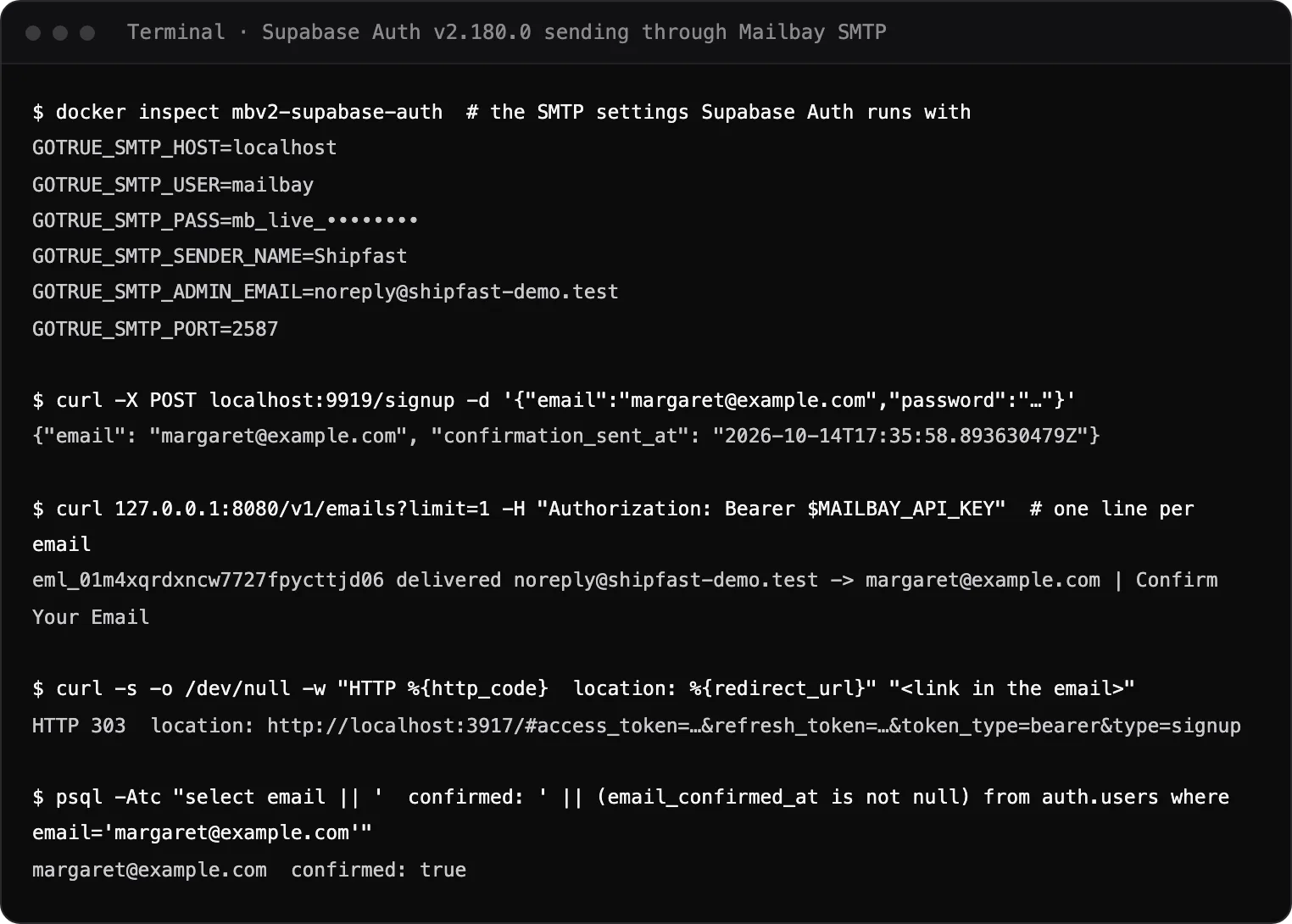
Set up in one paste
Three things in Mailbay, one form in Supabase. Nothing changes in your app code.
- 1
Verify your domain
Add it in Mailbay and publish the records it lists. Auth email then goes out asnoreply@yourdomain. The records are explained in the domains docs. - 2
Create a Sending only key
On the API keys page. It can send and read the send log, nothing else, so it is safe in a third party form. - 3
Paste the settings
Supabase dashboard, Authentication, SMTP Settings,Enable custom SMTP. Six fields, listed below. - 4
Raise Supabase's rate limit
Under Authentication, Rate Limits, set the email limit to what you expect. Supabase applies its own limit on top of ours.
The settings
Copy each value into Supabase's form. Self hosting, or using the Supabase CLI locally? The other tabs have the same settings in their format.
- Sender email
- noreply@yourdomain.comAny address on your verified domain
- Sender name
- Your product's name
- Host
- smtp.mailbay.dev
- Port number
- 465Or 587 (STARTTLS)
- Username
- mailbay
- Password
- mb_live_...Your Sending only key
GOTRUE_SMTP_HOST=smtp.mailbay.dev
GOTRUE_SMTP_PORT=587
GOTRUE_SMTP_USER=mailbay
GOTRUE_SMTP_PASS=mb_live_xxxxxxxxx      # a Sending only key
GOTRUE_SMTP_ADMIN_EMAIL=noreply@acme.com
GOTRUE_SMTP_SENDER_NAME=Acme
The variables we ran, with the hosted Mailbay values. The local run used port 2587, the local STARTTLS port.
[auth.email.smtp]
enabled = true
host = "smtp.mailbay.dev"
port = 587
user = "mailbay"
pass = "env(MAILBAY_API_KEY)"
admin_email = "noreply@acme.com"
sender_name = "Acme"
For supabase start. The CLI passes these to the same auth server; we ran the variables directly, not this file.
What it sends
Every email Supabase Auth sends goes through these settings, from your domain.
Confirm Your EmailSign up confirmation
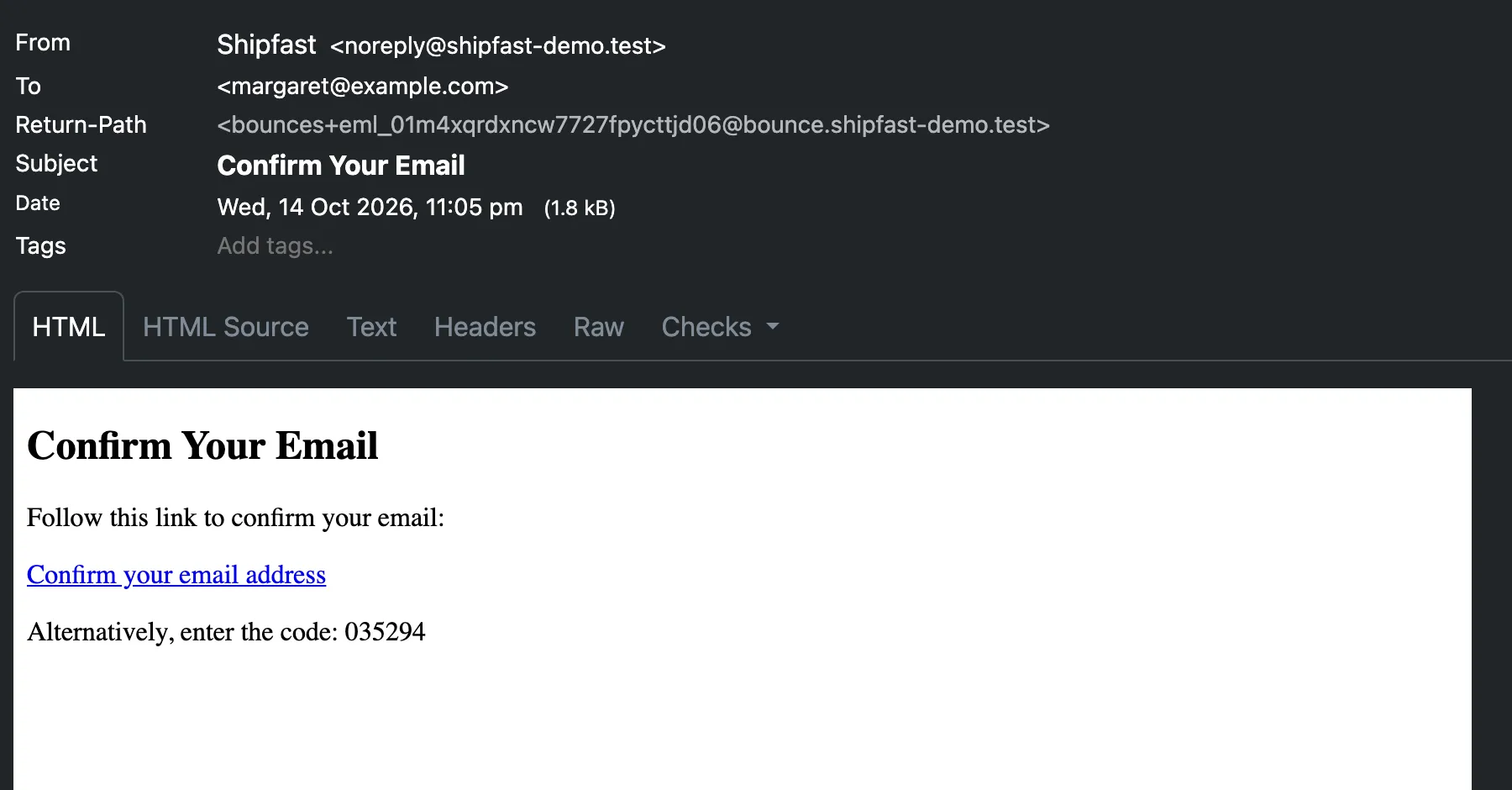
The link and the six digit code from Supabase's template, delivered in our run.Magic links and codes
Passwordless sign in, sent the moment the user asks for it.Password resets
The reset link, fromnoreply@yourdomaininstead of a shared sender.Invites and email changes
Team invites and the confirm your new address email use the same server.Logged like any other send
Each email shows in Mailbay's Sending log with its status, next to sends from your Next.js route handlers.
A real run
We started Supabase Auth v2.180.0 with the settings above pointing at a local Mailbay stack on October 14, 2026, then signed up a test user. The confirmation email went through Mailbay's SMTP server, was delivered, and opening its link confirmed the user. The terminal capture is at the top of this page; this is the email itself:
Limits to know
per key and per IP600 an hour
The SMTP server's default rate. Past it, Mailbay answers451 4.7.1and Supabase retries.new workspaces100 a day, first week
A workspace in its first 7 days can send to 100 recipients a day while its reputation builds.free plan3,000 a month
Free during the beta. Received mail never counts toward it.
If emails do not arrive
- 535 5.7.8 authentication failed
- The password is not a valid key. Paste a Sending only key; inbox keys cannot send over SMTP. More on 535 5.7.8.
- 550 5.7.1 not a domain of this project
- The sender email is on a domain that is not verified in the key's project. Verify it, or change the sender. More on 550 5.7.1.
- Supabase says rate limit exceeded
- That is Supabase's own email limit, not Mailbay's. Raise it under Authentication, Rate Limits.
- Delivered, but in spam
- Send one confirmation to the email deliverability test to check SPF, DKIM and DMARC for your domain.
Sending your own app email too, such as receipts? The Supabase, Next.js and Node guide uses the same key from code. Building a product on Supabase on your own? See Mailbay for indie hackers; built it with Lovable or Bolt? The prompt for AI built apps handles the rest of your app's email. Every tool is in the integrations directory, and the settings are the same as for Nodemailer or any SMTP client.
Questions
Did you test this with Supabase?
Yes, with Supabase Auth itself: the open source server (v2.180.0) that runs auth for every Supabase project, configured with the SMTP variables on this page and sending through a local Mailbay stack. A sign up sent the confirmation email, Mailbay delivered it, and the link confirmed the user. The hosted dashboard form writes the same six settings.
Should I use port 465 or 587?
Either. 465 is TLS from the first byte, 587 starts plain and upgrades with STARTTLS. Mailbay accepts a login only after TLS on both. Our run used the STARTTLS port.
Can I still edit the email templates?
Yes. Templates stay in Supabase under Authentication, Emails. Mailbay only carries the mail, so the subject and body you write there are what people receive.
What happens when an address bounces?
SMTP sends go through the same pipeline as the API: they appear in Mailbay's Sending log with their status, emit message events and webhooks, and a hard bounce adds the address to the project's suppressions.
What does it cost?
Mailbay is free during the private beta, with 3,000 emails a month on the free plan. Received mail never counts toward that.
Related integrations
- Next.jsSend from a route handler with the Resend SDK, the mailbay SDK or fetch.
- Auth.jsMagic links with the Nodemailer provider and Mailbay's SMTP server.
- Better AuthSend verification and reset emails from its callbacks.
- ClerkTurn off Clerk's delivery for a template, send its email.created webhook through Mailbay.

Read next
Join the beta
Mailbay is in private beta and free while the beta runs: inboxes, sending, your own domains and MCP. We invite people in small batches and read every note on the form.