A Resend alternative that takes the same request body
Resend is a polished sending API. People look elsewhere when received mail eats into the sending quota, when 30 days of data is not enough, or when they want agent and support inboxes next to app email.
Updated 4 min read
On this page (6)
Most people reading this already send with Resend and like it. This page is about the moments they start looking, when staying is the better call, and a migration that keeps your request body. The side by side table is on Mailbay vs Resend, and the other switch guides are on the alternatives index.
Why people look for an alternative
- Received mail uses the sending quota. “Each received email counts as 1 email against your daily and monthly limits” [2]. An app that receives replies, or an agent with an inbox, spends its sending allowance on mail it did not send.
- 30 days of data. Resend keeps email data for 30 days on every plan [2].
- A big step from free to paid. Free is 3,000 emails a month and 100 a day; the next plan is Pro at $20 a month, and Resend says there is no plan in between [1].
- One request rate for everyone. 10 requests per second per team [3], the same on every plan [1].
When to stay with Resend
- You rely on stored templates, React Email rendering or broadcasts. Mailbay takes HTML and text you render yourself. It does send batches of up to 100 and scheduled email, like Resend.
- You want an SDK in your language. Resend has official SDKs for Node.js, Python, PHP, Ruby, Go, Java, Rust, .NET and more [6]. Mailbay has one, for Node and edge runtimes, coming to npm; the Resend Node SDK also works against Mailbay for sending.
- Large attachments. Resend accepts emails up to 40 MB after encoding [5]; Mailbay's limit is 25 MB.
- Inboxes on your own domain are enough. Resend now has inboxes with threads, in private beta, on your verified domains [4]. If you are in that beta and it covers your support mail, you may not need a second product.
- Track record. Resend is established. Mailbay is in private beta, and our sending IPs are warming up.
How Mailbay differs
Mailbay is in private beta and free while it runs. The Mailbay prices below are the planned plans from our pricing page; billing is not live yet.
- Receiving is not metered. Plans count sent recipients only, so inboxes for agents, replies and support mail cost nothing extra.
- Mail is kept until you delete it, unless you set a retention period for the workspace.
- Inboxes for agents and tests, not only people. A private
mailbay.emaildomain with a Catch-all, a wait endpoint that returns one time codes and links, an MCP server, and IMAP for mail apps. - A cheaper first paid step, planned. Pro is planned at $9 a month for 50,000 emails and 25 inboxes.
Other options
If you only send, Postmark and Amazon SES are the usual alternatives, and Postmark's track record for transactional mail is long; we compare it in Mailbay vs Postmark. If your reason to leave is inbound mail for AI agents, look at AgentMail too, and read our AgentMail alternative page for how it differs.
Moving from Resend
The send request does not change. Mailbay's POST /v1/emails accepts Resend's documented fields and the Idempotency-Key header; we ran Resend's own examples and its Node SDK against it, as described on the comparison page. What changes is around it:
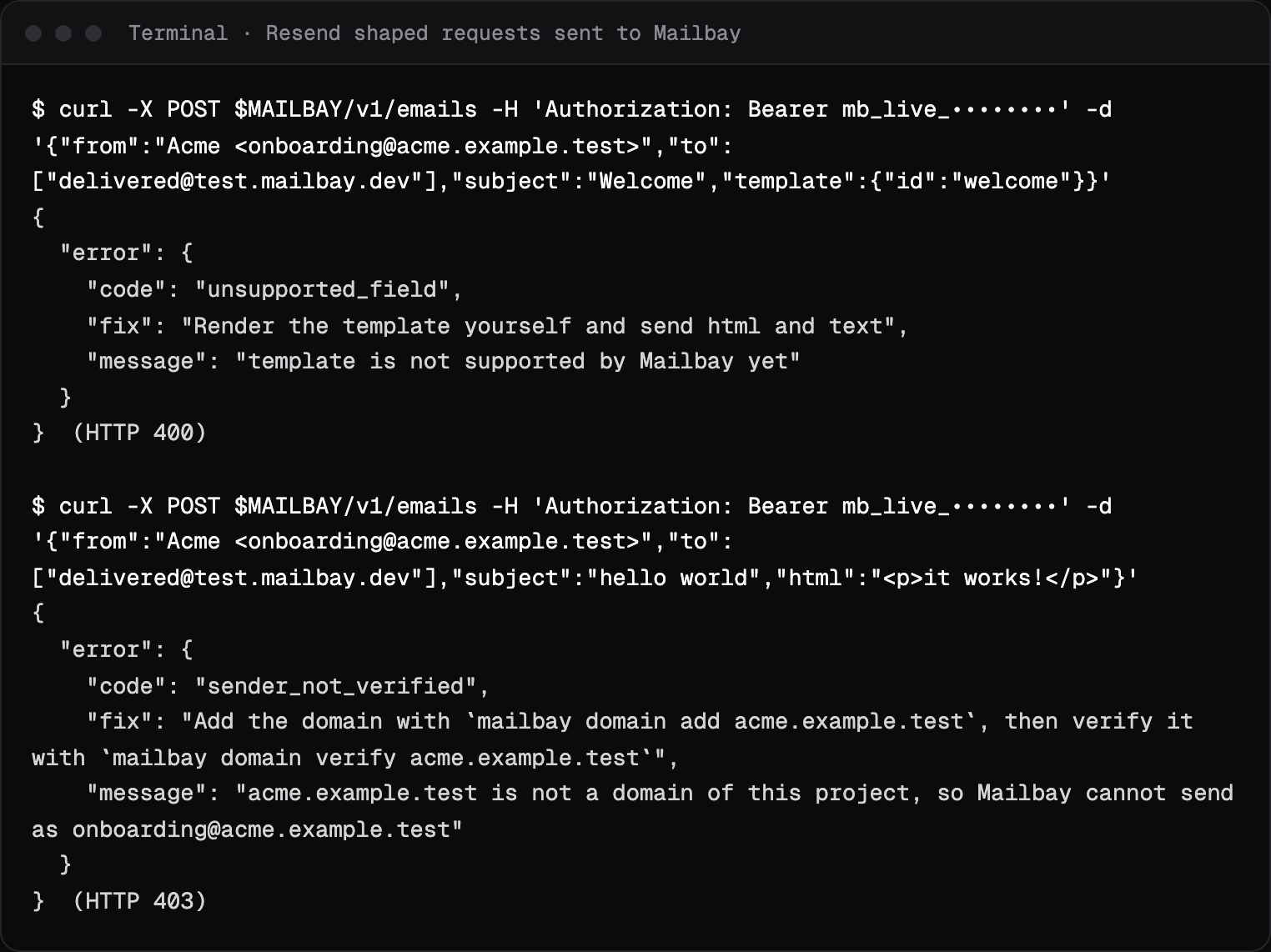
- Verify the domain first. Until it is verified, Mailbay refuses the send with
sender_not_verifiedand the commands that fix it, as in the capture below. Resend's DKIM record can stay while you switch, since the selectors differ; see the records Mailbay asks for. Once it is verified, send one message to the free deliverability test to check SPF, DKIM and DMARC before you move real traffic. - Remove the fields Mailbay does not support:
template,react,topic_idand attachmentpathURLs. They are refused withunsupported_fieldand a fix, never silently dropped.scheduled_atandPOST /emails/batchcarry over as they are; see the Emails API. - Swap the base URL and key:
https://api.mailbay.dev/v1and a Mailbay sending key. - Map the webhook events. Resend's
email.delivered,email.delivery_delayed,email.bounced,email.complained,email.failedandemail.received[7] becomemessage.delivered,message.deferred,message.bounced,message.complained,message.failedandmessage.received. Resend signs withsvix-id,svix-timestampandsvix-signature[8]; Mailbay withwebhook-id,webhook-timestampandwebhook-signature. - Move inbound mail. If you receive with Resend, save what you need through its list of received emails [9], then point the receiving domain's MX at Mailbay. Mail then lands in inboxes with threads instead of arriving only as webhooks.
RESEND_BASE_URL=https://api.mailbay.dev/v1
RESEND_API_KEY=mb_live_xxxxxxxxx   # a Mailbay sending key
Calling the API from Python instead? The Python integration sends and receives with plain requests. Bounces and deferrals come back with the remote server's SMTP reply; the SMTP error code reference explains the common ones.
Sources, read on October 14, 2026
- [1]Resend pricing: resend.com/pricing
- [2]Resend, account quotas and limits: resend.com/docs/knowledge-base/account-quotas-and-limits
- [3]Resend, rate limit: resend.com/docs/api-reference/rate-limit
- [4]Resend, create inbox (private beta): resend.com/docs/api-reference/inboxes/create-inbox
- [5]Resend, attachments: resend.com/docs/dashboard/emails/attachments
- [6]Resend, SDKs: resend.com/docs/sdks
- [7]Resend, webhook event types: resend.com/docs/webhooks/event-types
- [8]Resend, verify webhook requests: resend.com/docs/webhooks/verify-webhooks-requests
- [9]Resend, list received emails: resend.com/docs/api-reference/emails/list-received-emails
Prices change. If something here is out of date or wrong, email hello@mailbay.dev and we will fix it.
For a team weighing the switch, Mailbay for SaaS teams shows sending and the support inbox side by side.
Questions
Is Mailbay a drop in replacement for Resend?
For sending, close to it: POST /v1/emails accepts Resend's documented request body and answers with an id, scheduled_at and batches of up to 100 work, and the official Resend Node SDK works when RESEND_BASE_URL points at Mailbay. Stored templates and React rendering are not supported and are refused rather than ignored.
Does received mail count against my Mailbay plan?
No. Mailbay's plans count sent recipients only. Resend counts each received email as one email against its daily and monthly limits.
Can I keep my Resend webhooks code?
The shape is close: both send an id, a timestamp and a signature header with each delivery. The names differ, so update the code: Resend sends svix- headers and email.* events, Mailbay sends webhook- headers and message.* events.
Is Mailbay cheaper than Resend?
Mailbay is free during the beta. Its planned Pro plan is $9 a month for 50,000 emails, against $20 for Resend Pro. Billing is not live yet, so compare again when it is.
Read next
- Mailbay vs ResendResend is a polished, proven sending API. Mailbay accepts the same request body for sending, so moving is a base URL and a key, and it adds inboxes people and agents read.
- Send and receive email in Python with requestsNo SDK needed: Mailbay's REST API works with plain requests. This script receives and sends, and handles errors with the fix Mailbay returns.
- Send email from Supabase, Next.js or NodePassword resets, magic links and receipts need a sender that is authenticated for your domain. Here is the same job four ways: Supabase Auth over SMTP, Nodemailer, plain fetch from Next.js, and the Resend SDK.
Join the beta
Mailbay is in private beta and free while the beta runs: inboxes, sending, your own domains and MCP. We invite people in small batches and read every note on the form.