
Playwright email testing with a catch-all inbox
A Playwright fixture that gives every test its own email address and waits for the mail to arrive. No inboxes to create, no polling loop, and parallel workers never read each other's mail.
const { message, codes } = await email.next();
await page.getByLabel("Code").fill(codes[0]);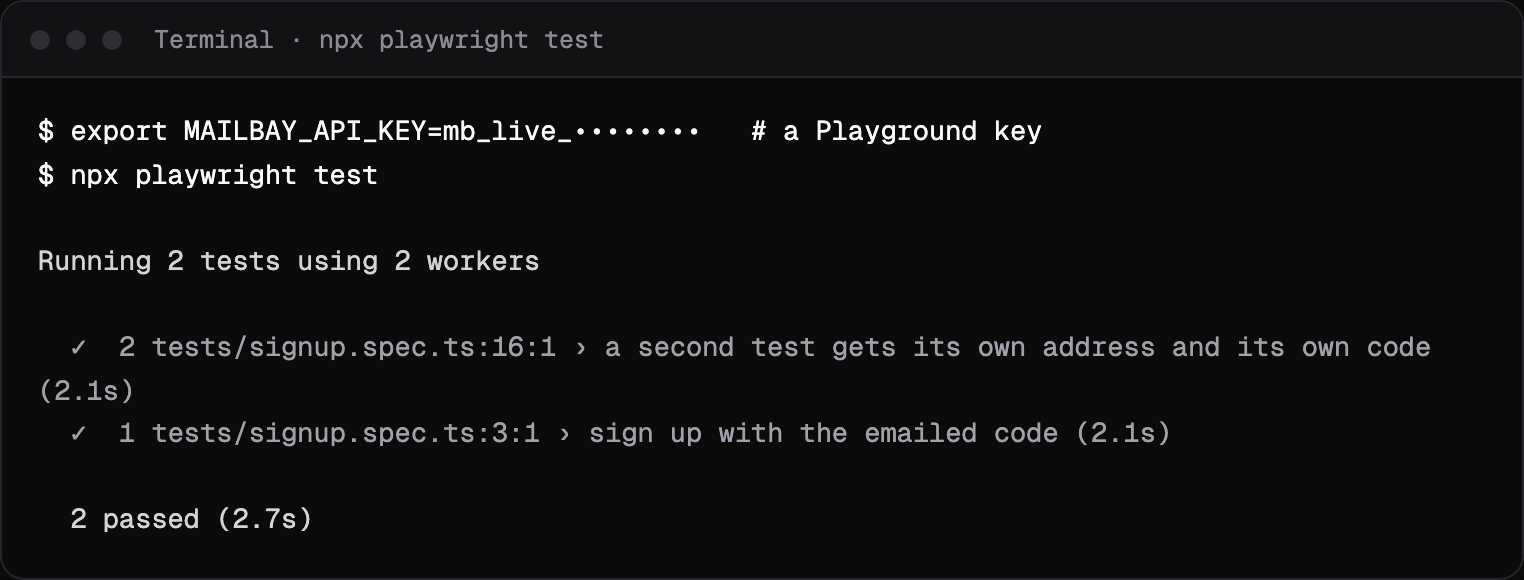
Set up in one paste
What you need:
- 1
A Playground API key
The Catch-all lives in the Playground project, so create the key there. A key from another project cannot see it, and the fixture says so. - 2
An app that sends email
To the address a test types in. For this page we used a 26 line Node server that emails a six digit code; your real app takes its place. - 3
Playwright
We used 1.64. The fixture uses onlyfetch, so there is nothing else to install.
Why a Catch-all works for tests is explained in catch-all inboxes for end to end tests. This page is the complete, runnable project. Testing is your job? See Mailbay for QA and test engineers.
The fixture
A Playwright fixture gives each test an email object: a fresh address, and a next() that blocks until mail to that address arrives. It notes the time before the test acts, so an email that arrives before the wait starts is still found. The wait endpoint is documented under wait for an email.
import { test as base } from "@playwright/test";

const API = process.env.MAILBAY_API_URL ?? "https://api.mailbay.dev/v1";
const headers = { Authorization: `Bearer ${process.env.MAILBAY_API_KEY}` };

async function get(path: string) {
  const res = await fetch(`${API}${path}`, { headers });
  const body = await res.json();
  if (!res.ok) throw new Error(`${body.error.code}: ${body.error.message} (fix: ${body.error.fix})`);
  return body;
}

type Email = { message: { subject: string; text: string }; codes: string[]; links: string[] };

/** `email.address` is fresh for every test; `email.next()` blocks until mail to it arrives. */
export const test = base.extend<{ email: { address: string; next: (timeout?: number) => Promise<Email> } }>({
  email: async ({}, use, testInfo) => {
    const me = await get("/me");
    const { data } = await get("/inboxes");
    const catchAll = data.find((i: { catch_all: boolean }) => i.catch_all);
    if (!catchAll) throw new Error("No Catch-all inbox: use a key from the Playground project");
    const address = `e2e-${testInfo.workerIndex}-${Date.now()}-${Math.random().toString(36).slice(2, 7)}@${me.shared_domain}`;
    const after = new Date().toISOString();
    await use({
      address,
      next: (timeout = 30) =>
        get(`/inboxes/${catchAll.id}/wait?${new URLSearchParams({ to: address, after, timeout: String(timeout) })}`),
    });
  },
});
export { expect } from "@playwright/test";
import { test, expect } from "./mailbay";
test("sign up with the emailed code", async ({ page, email }) => {
await page.goto("/");
await page.getByLabel("Email").fill(email.address);
await page.getByRole("button", { name: "Sign up" }).click();
const { message, codes } = await email.next();
expect(message.subject).toBe("Your Acme sign in code");
await page.getByLabel("Code").fill(codes[0]);
await page.getByRole("button", { name: "Verify" }).click();
await expect(page.getByRole("heading", { name: "Welcome to Acme" })).toBeVisible();
});
test("a second test gets its own address and its own code", async ({ page, email }) => {
await page.goto("/");
await page.getByLabel("Email").fill(email.address);
await page.getByRole("button", { name: "Sign up" }).click();
const { codes } = await email.next();
expect(codes[0]).toMatch(/^\d{6}$/);
});import { defineConfig } from "@playwright/test";
export default defineConfig({
testDir: "./tests",
fullyParallel: true,
use: { baseURL: "http://localhost:4300" },
webServer: { command: "node app/server.mjs", url: "http://localhost:4300" },
});What the tests check
email.next()Sign up with the emailed code
The first test signs up, reads the subject and fills incodes[0], then expects the welcome heading.Its own address and code
The second test gets its own address and checks the code is six digits.Parallel workers
Each address carries the worker index, a timestamp and a random part, so workers never read each other's mail.No cleanup
Addresses are never reused, so there is nothing to delete between runs.Errors with a fix
A failed API call throws with the code, the message and the fix Mailbay returned.
Run it
We ran the project on October 14, 2026 against a local Mailbay stack, with the app sending over SMTP to Mailbay's receiving server. Two workers, two tests, each with its own address and code: the capture at the top of this page. Against the hosted service, leave MAILBAY_API_URL unset; it defaults to https://api.mailbay.dev/v1.
In CI
The only secret is the key. Store it as a CI secret and expose it to the test step:
- run: npx playwright test
  env:
    MAILBAY_API_KEY: ${{ secrets.MAILBAY_PLAYGROUND_KEY }}
Addresses are never reused, so there is nothing to clean up between runs. Received mail does not count toward a plan's sending allowance; Mailbay's receiving server does limit one workspace to 300 recipients per 10 minutes, which matters only for very large suites. These tests prove your app sends the right email; whether it reaches inboxes is a separate check, which the email deliverability test runs on one real message.
When a wait times out
- 408 wait_timeout
- Nothing arrived for that address in time. Check the address your app actually sent to, and that the app sends to external domains in the test environment.
- “No Catch-all inbox”
- The key belongs to a project other than the Playground.
- The code is not in codes
- Mailbay extracts 4 to 8 digit codes. For other formats, read
message.textor uselinks.
Moving from Mailosaur? The Mailosaur alternative page maps its calls to these. Testing from Python instead? See the Python integration, and all integrations on the integrations page.
Questions
Do I need to create an inbox for every test?
No. Any address under your workspace's private mailbay.email domain reaches the Catch-all, so each test makes up an address and waits for mail to exactly that address.
How do parallel workers avoid reading each other's email?
Each test gets its own address, with the worker index, a timestamp and a random part in it, and waits with to set to that exact address. A message to another test's address never matches.
Does this work with Cypress?
Yes. The fixture is plain fetch calls to the API. In Cypress, put the same two calls in a cy.task so they run in Node, and call the task from the test.
How long can a test wait for an email?
One wait call blocks for up to 120 seconds. If it times out, Mailbay answers 408 with wait_timeout, and calling wait again is safe.
Related integrations
Read next
Join the beta
Mailbay is in private beta and free while the beta runs: inboxes, sending, your own domains and MCP. We invite people in small batches and read every note on the form.