550 5.7.25: reverse DNS check failed
The receiving server looked up the name of the IP address your mail came from and found none, or found one that does not resolve back to that IP.
Updated 2 min read
On this page (7)
550 5.7.25 is a permanent SMTP reply: no reverse DNS for the IP. This page is part of our SMTP error code reference, where every code links to the RFC and to what Gmail, Outlook and Yahoo publish about it.
- Kind
- Permanent: sending the same message again fails the same way
- Retry by hand
- No, fix the cause first
- In Mailbay
bounced, address not suppressed
What 550 5.7.25 means
RFC 7372 registers X.7.25 as "Reverse DNS validation failed", with the basic code 550 [1].
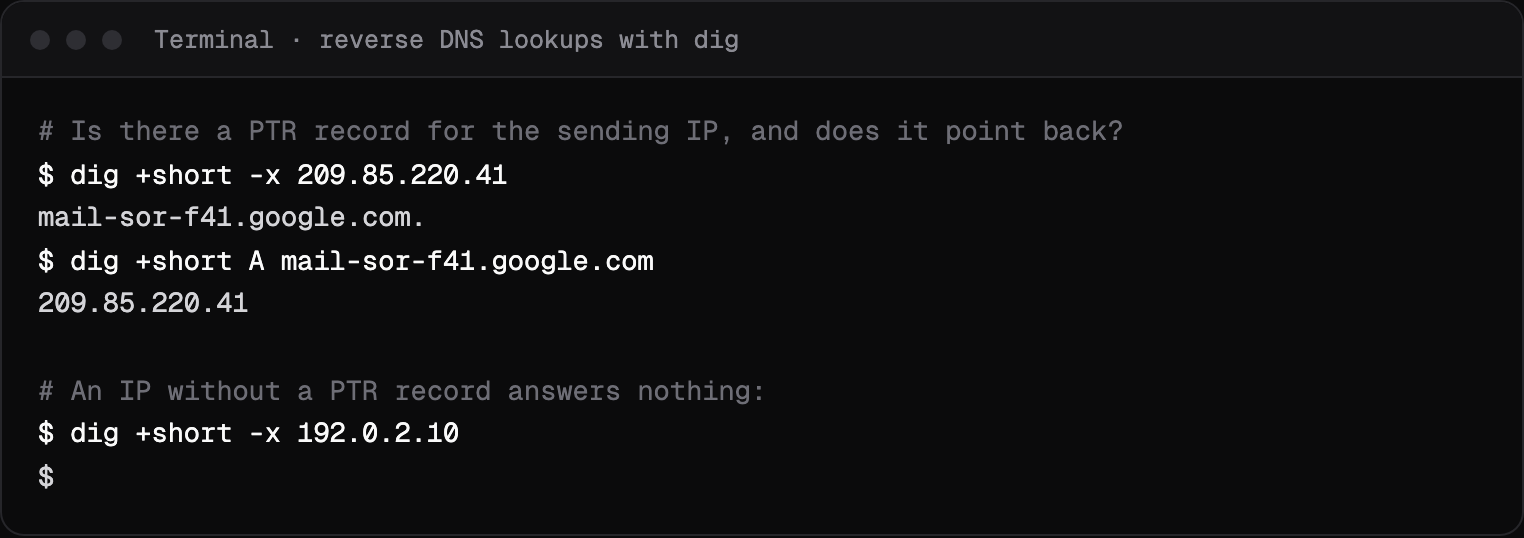
A PTR record maps an IP address to a host name. Receivers usually also check that the name resolves back to the same IP, which is called forward confirmed reverse DNS.
What Gmail, Outlook and Yahoo say
- Gmail
- "550 5.7.25 This message was blocked because the sending IP address doesn't have a PTR record, or the forwarding DNS entry doesn't reference the sending IP address." [2]. Its guidelines require "valid forward and reverse DNS records, also referred to as PTR records" from all senders [3].
- Yahoo
- Requires all senders to "Have a valid forward and reverse DNS record for your sending IPs" [4].
Outlook and Microsoft 365 does not list 550 5.7.25 on the error pages we read, so we do not guess what it means by it.
Sources, read on October 14, 2026
- [1]RFC 7372, Email Authentication Status Codes: www.rfc-editor.org/rfc/rfc7372
- [2]Google, Gmail SMTP errors and codes: knowledge.workspace.google.com/admin/support/troubleshooting/gmail-smtp-errors-and-codes
- [3]Google, Email sender guidelines: support.google.com/a/answer/81126
- [4]Yahoo Sender Hub, best practices: senders.yahooinc.com/best-practices/
Prices change. If something here is out of date or wrong, email hello@mailbay.dev and we will fix it.
Common causes
- A new server or VPS whose provider sets no PTR by default.
- A PTR that names a host whose A or AAAA record points somewhere else.
- Sending over IPv6 from an address that has no PTR at all.
How to fix it
- Look up the PTR with
dig -x <ip>, then look up the name it returns and check that it gives back the same IP. - Set the PTR in your hosting provider's panel; only the owner of the IP range can.
- Or send through a provider whose servers already have it, and stop maintaining your own sending IP.
How Mailbay reports it
When a recipient's server answers 550 5.7.25 to mail you send through Mailbay, the recipient becomes bounced and you get a message.bounced event with the server's reply in response and permanent: false. The message statuses page lists every state.
A policy refusal says nothing about whether the address exists, so Mailbay does not suppress it, and it does not count toward the automatic pause, which only counts hard bounces and spam complaints.
When you send through Mailbay, mail leaves from Mailbay's own sending servers, so their reverse DNS is ours to keep right, not yours. Your part is the domain records (SPF, DKIM and DMARC).
Related codes
- 550 5.7.26: failed SPF, DKIM or DMARC, permanent.
- 421 4.7.0: temporary refusal, connection closed, temporary.
- 550 5.7.515: sender rules at Outlook.com, permanent.
- 550 5.7.1: refused for a policy reason, permanent.
- 451 4.7.1: deferred: rate limit or policy, temporary.
Seeing an API error rather than an SMTP code? Mailbay's own errors, each with a fix, are on the errors page.
Questions
Can I set a PTR record in my DNS provider?
Usually not. PTR records live in the reverse zone of the IP range, which belongs to whoever owns the IP: your hosting or cloud provider. Set it in their panel or ask their support.
Does Gmail check PTR for IPv6?
Yes. Gmail has a separate 550 5.7.1 refusal for mail that does not meet its IPv6 guidelines on PTR records and authentication.
Read next
- 550 5.7.26: the email is unauthenticatedThe message failed the receiver's authentication checks, so it was refused. The fix is in your DNS: SPF, DKIM and a DMARC record that line up with your From domain.
- 421 4.7.0: try again later, closing connectionThe receiving server is not refusing your mail for good. It closed the connection for a security or reputation reason, and expects your server to try again later.
- SMTP error codesWhat a bounce or deferral code means, what Gmail, Outlook and Yahoo say about it in their own words, and how to fix it. Each page shows a real SMTP session.
Join the beta
Mailbay is in private beta and free while the beta runs: inboxes, sending, your own domains and MCP. We invite people in small batches and read every note on the form.