550 5.1.1: the email account does not exist
The receiving server says the address you sent to does not exist. It is a permanent failure: sending again to the same address will fail the same way.
Updated 3 min read
On this page (7)
550 5.1.1 is a permanent SMTP reply: mailbox does not exist. This page is part of our SMTP error code reference, where every code links to the RFC and to what Gmail, Outlook and Yahoo publish about it.
- Kind
- Permanent: sending the same message again fails the same way
- Retry by hand
- No, fix the cause first
- In Mailbay
bounced, address suppressed
What 550 5.1.1 means
The basic code 550 is "Requested action not taken: mailbox unavailable (e.g., mailbox not found, no access, or command rejected for policy reasons)" [1]. The enhanced code narrows it down: X.1.1 is "Bad destination mailbox address", meaning "The mailbox specified in the address does not exist", the part left of the @ is wrong [2]. The 5 in front makes it permanent.
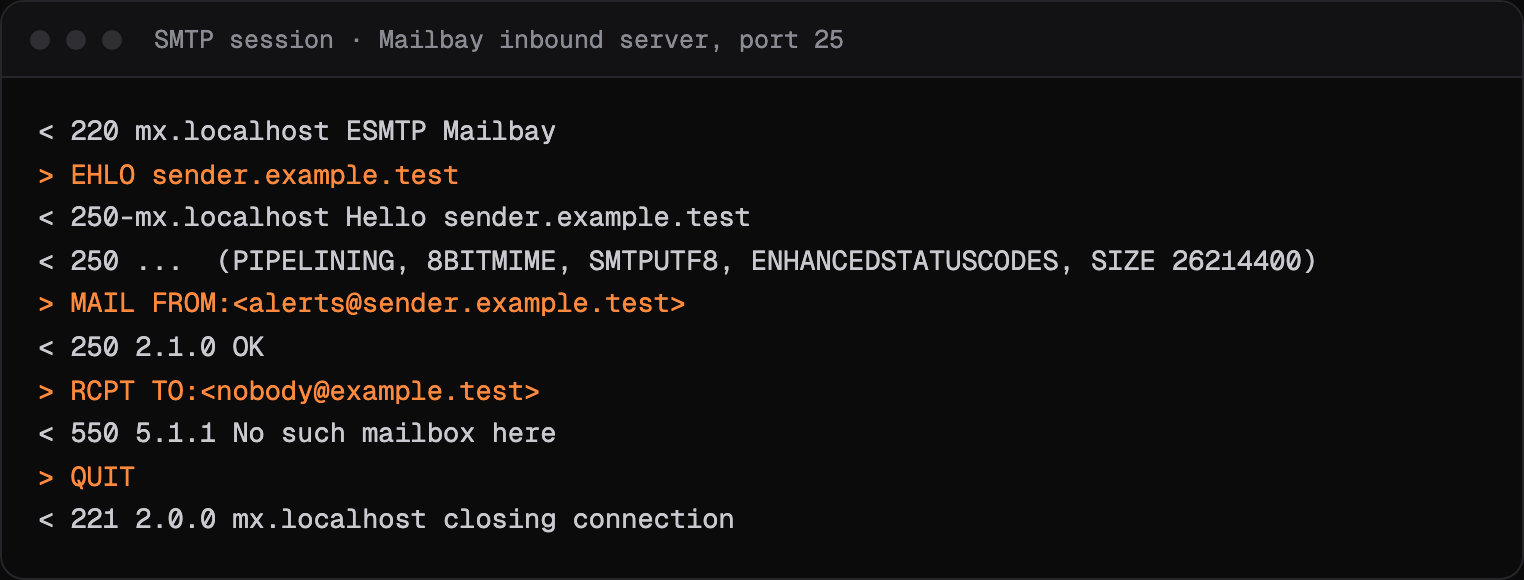
Most servers send it in answer to RCPT TO, before the message itself is transferred, so nothing was delivered to anyone at that address.
What Gmail, Outlook and Yahoo say
- Gmail
- "550 5.1.1 The email account that you tried to reach does not exist. Please double-check the recipient's email address for typos or unnecessary spaces." [3]
- Outlook and Microsoft 365
- Lists 5.1.1 as "Bad destination mailbox address": the sender mistyped the address, or it does not exist in the destination system [4].
- Yahoo
- Yahoo's page shows its own wording for the same case in a sample bounce, with a 554 and no enhanced code: "554 delivery error: dd This user doesn't have a yahoo.com account" [5].
Sources, read on October 14, 2026
- [1]RFC 5321, Simple Mail Transfer Protocol, section 4.2: www.rfc-editor.org/rfc/rfc5321#section-4.2
- [2]RFC 3463, Enhanced Mail System Status Codes: www.rfc-editor.org/rfc/rfc3463
- [3]Google, Gmail SMTP errors and codes: knowledge.workspace.google.com/admin/support/troubleshooting/gmail-smtp-errors-and-codes
- [4]Microsoft Learn, Email non-delivery reports and SMTP errors in Exchange Online: learn.microsoft.com/en-us/troubleshoot/exchange/email-delivery/ndr/non-delivery-reports-in-exchange-online
- [5]Yahoo Sender Hub, SMTP error codes: senders.yahooinc.com/smtp-error-codes/
Prices change. If something here is out of date or wrong, email hello@mailbay.dev and we will fix it.
Common causes
- A typo in the address, such as a missing letter or a wrong domain ending.
- The account was deleted, or the person left the company that ran it.
- An old list: addresses that worked a year ago and have since been closed.
- A form without confirmation, where people enter made up addresses.
How to fix it
- Check the address for typos against the source it came from.
- Do not retry. The answer is permanent, and repeated sends to addresses that do not exist hurt your sender reputation.
- Remove the address from your list, or mark it as bad in your database.
- For sign up forms, confirm addresses with a link before you send anything else to them.
How Mailbay reports it
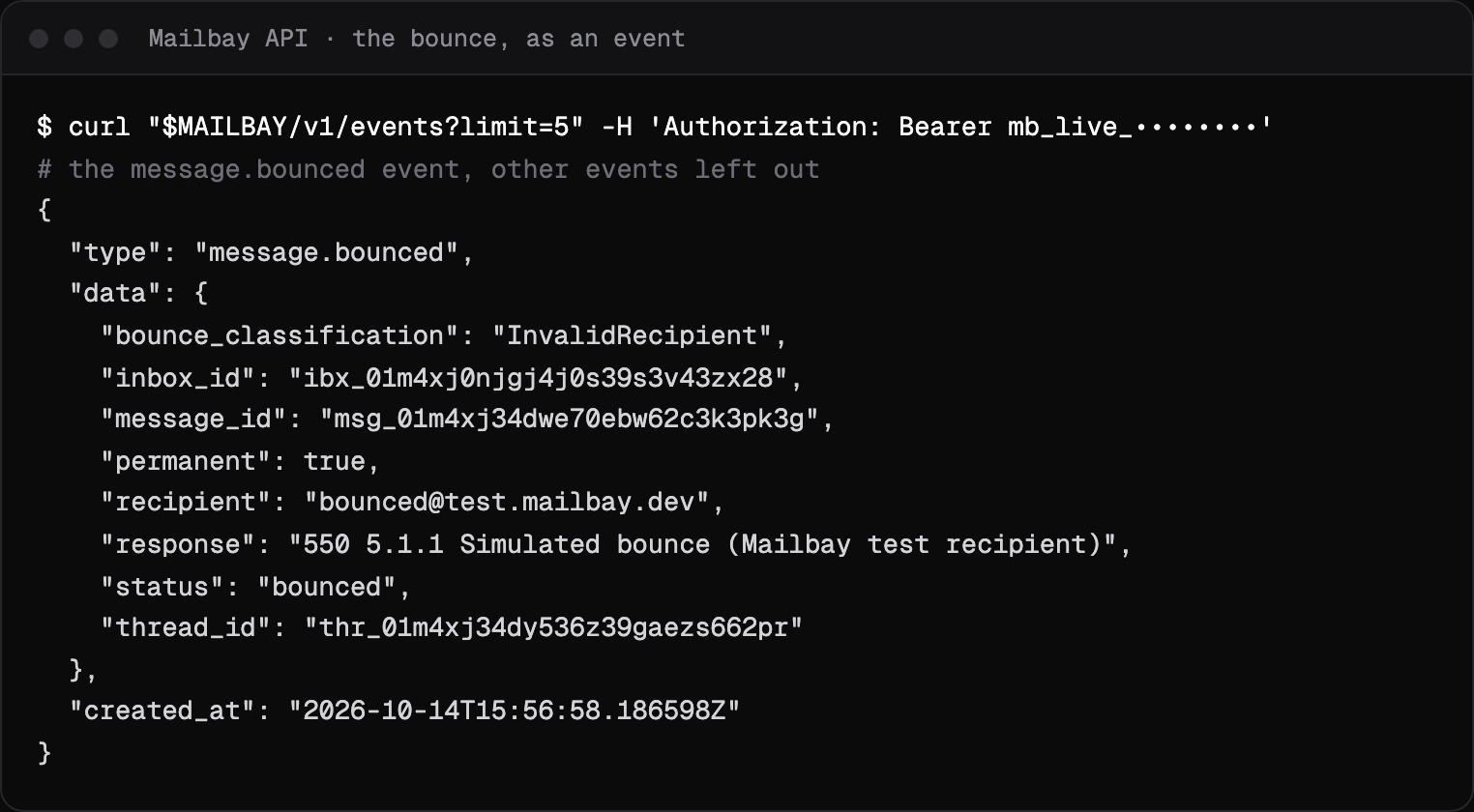
When a recipient's server answers 550 5.1.1 to mail you send through Mailbay, the recipient becomes bounced and you get a message.bounced event with the server's reply in response and permanent: true. The message statuses page lists every state.
5.1.1 says the address will not work, so Mailbay adds it to the project's suppression list: the next send to it fails with recipient_suppressed before anything leaves. Hard bounces also count toward the automatic pause, which stops a workspace whose hard bounces reach 5% of at least 50 recipients in 24 hours, with at least 3 of them.
Mailbay's receiving server sends this code itself when mail arrives for an address it has no inbox for: 550 5.1.1 No such mailbox here. On your private mailbay.email domain that never happens, because any address under your code reaches the Catch-all (how the address space works).
To see the sending side without bouncing real mail, send to bounced@test.mailbay.dev: Mailbay simulates a 550 5.1.1 and emits the same event as a real bounce, but never suppresses the test address (test addresses).
Related codes
- 550 5.7.1: refused for a policy reason, permanent.
- 421 4.7.0: temporary refusal, connection closed, temporary.
- 552 5.3.4: message too big, permanent.
- 550 5.7.26: failed SPF, DKIM or DMARC, permanent.
- 451 4.7.1: deferred: rate limit or policy, temporary.
Seeing an API error rather than an SMTP code? Mailbay's own errors, each with a fix, are on the errors page.
Questions
Is 550 5.1.1 a hard bounce?
Yes. The 5 makes it permanent and 5.1.1 says the mailbox does not exist, so it is a hard bounce. Mailbay adds the address to the project's suppression list the first time it happens.
Should I retry an email that got 550 5.1.1?
No. Sending again to the same address gets the same answer, and many repeated sends to addresses that do not exist lower your sender reputation. Fix the address or remove it.
Can 550 5.1.1 be wrong?
Rarely. A receiving server with a broken directory can reject real addresses. If the recipient confirms the address works, ask them to check with their mail administrator, then delete the suppression in Mailbay.
Read next
- 550 5.7.1: message refused, delivery not authorizedThe receiving server understood the message and refused it on purpose. 5.7.1 covers many policies, so the text after the code matters more than the code itself.
- 421 4.7.0: try again later, closing connectionThe receiving server is not refusing your mail for good. It closed the connection for a security or reputation reason, and expects your server to try again later.
- SMTP error codesWhat a bounce or deferral code means, what Gmail, Outlook and Yahoo say about it in their own words, and how to fix it. Each page shows a real SMTP session.
Join the beta
Mailbay is in private beta and free while the beta runs: inboxes, sending, your own domains and MCP. We invite people in small batches and read every note on the form.