530 5.7.0: authentication required
Your app tried to send without signing in. Submission servers only accept mail from authenticated clients, and most only allow signing in after STARTTLS.
Updated 2 min read
On this page (7)
530 5.7.0 is a permanent SMTP reply: sign in first. This page is part of our SMTP error code reference, where every code links to the RFC and to what Gmail, Outlook and Yahoo publish about it.
- Kind
- Permanent: sending the same message again fails the same way
- Retry by hand
- No, fix the cause first
- In Mailbay
bounced, address not suppressed
What 530 5.7.0 means
RFC 4954 defines 530 5.7.0 Authentication required, which "SHOULD be returned by any command other than AUTH, EHLO, HELO, NOOP, RSET, or QUIT when server policy requires authentication" [1].
What Gmail, Outlook and Yahoo say
- Gmail
- Lists "530 5.7.0 Authentication required." [2].
Outlook and Microsoft 365 and Yahoo do not list 530 5.7.0 on the error pages we read, so we do not guess what they mean by it.
Sources, read on October 14, 2026
- [1]RFC 4954, SMTP Service Extension for Authentication, section 6: www.rfc-editor.org/rfc/rfc4954#section-6
- [2]Google, Gmail SMTP errors and codes: knowledge.workspace.google.com/admin/support/troubleshooting/gmail-smtp-errors-and-codes
Prices change. If something here is out of date or wrong, email hello@mailbay.dev and we will fix it.
Common causes
- SMTP authentication is turned off in the app's mail settings, or the username is empty.
- The client connects on port 587 but never sends STARTTLS, and the server only offers AUTH after it.
- A library configured for port 25, where it does not try to sign in.
How to fix it
- Turn on authentication and set the username and password or key.
- On port 587, make sure the client upgrades with STARTTLS (Nodemailer
secure: falsedoes this when the server offers it). On port 465, use implicit TLS (secure: true). - If you then get 535 5.7.8, the server is now asking for credentials and the ones you sent are wrong.
How Mailbay reports it
When a recipient's server answers 530 5.7.0 to mail you send through Mailbay, the recipient becomes bounced and you get a message.bounced event with the server's reply in response and permanent: false. The message statuses page lists every state.
A policy refusal says nothing about whether the address exists, so Mailbay does not suppress it, and it does not count toward the automatic pause, which only counts hard bounces and spam complaints.
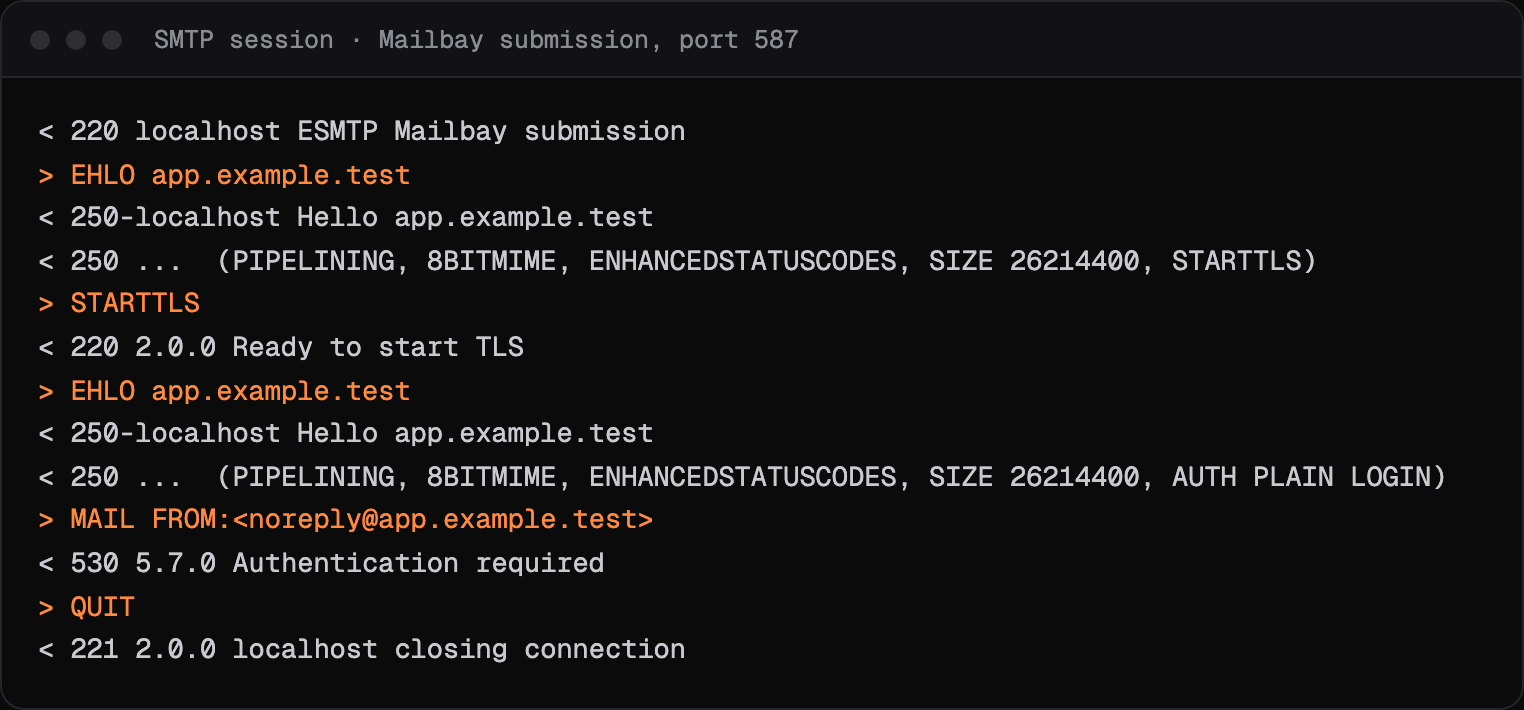
Mailbay's submission server answers 530 5.7.0 Must issue a STARTTLS command first when a client tries to sign in or send without TLS, and 530 5.7.0 Authentication required when it sends MAIL FROM without AUTH. It only lists AUTH PLAIN LOGIN in its EHLO answer after STARTTLS, as the session below shows.
Related codes
- 535 5.7.8: login rejected, permanent.
- 550 5.7.1: refused for a policy reason, permanent.
- 552 5.3.4: message too big, permanent.
- 421 4.7.0: temporary refusal, connection closed, temporary.
- 451 4.7.1: deferred: rate limit or policy, temporary.
Seeing an API error rather than an SMTP code? Mailbay's own errors, each with a fix, are on the errors page.
Questions
Which port should I use to avoid 530 5.7.0?
Use 587 with STARTTLS or 465 with implicit TLS, and sign in. Port 25 is for servers delivering to each other, not for apps submitting mail.
What does must issue a STARTTLS command first mean?
The server will not accept a sign in or a message over an unencrypted connection. Configure the client to start TLS on 587, or connect to 465.
Read next
- 535 5.7.8: username and password not acceptedYour app reached the SMTP server and tried to sign in, and the server said no. The problem is the credentials or the way they were sent, not the message.
- 550 5.7.1: message refused, delivery not authorizedThe receiving server understood the message and refused it on purpose. 5.7.1 covers many policies, so the text after the code matters more than the code itself.
- SMTP error codesWhat a bounce or deferral code means, what Gmail, Outlook and Yahoo say about it in their own words, and how to fix it. Each page shows a real SMTP session.
Join the beta
Mailbay is in private beta and free while the beta runs: inboxes, sending, your own domains and MCP. We invite people in small batches and read every note on the form.